
← Back to A1 Airside

A1 Case study · Teesside International Airport

From a failing in‑house system to A1 Airside

Teesside's wildlife team relied on a logging system that nobody could maintain any more. Here's how we built what they needed and moved them over to A1 Airside.

Teesside International Airport
Before
An in‑house system that could no longer be maintained
Recommended by
Their wildlife management auditors
New features
Ready within a couple of weeks
Today
A1 Airside is in full use

The story

The problem

The team at Teesside have used their own system for wildlife logging for several years, developed by an ex member of staff over time to do pretty much all the things they needed it to. Once the staff member moved on and as time passed, it started to malfunction and with no longer any ability to update or maintain it, the team were forced to look around for an alternative.

What we did

Our system was recommended by their wildlife management auditors and they contacted us to arrange an onsite meeting so we could review the existing system and assess how our new system could be used in its place. After a very productive and entertaining meeting with the wildlife team, we agreed that Abbeytek would do an initial set of changes to the logging app which would make the transition easier for the logging team and would also mirror some of the functions provided by the old system that ours did not.

The result

Teesside signed up shortly afterwards, and the new features were added over the next couple of weeks. After a period of training, the team moved over to A1 Airside, which is now in full use.

“The changes have been updated and the session number works, brilliant. The weather tab is ideal.”
Teesside International Airport

Built with Teesside

Fitting the system to the team

We didn't ask the team to change how they worked. Instead we added what their old system did, and a few things it didn't, to the logging app.

TS-0412TS-0412TS-0412 SESSION ID TS-0412

Shared session IDs

Every logging session gets an ID that stays on screen throughout and is shared with the other teams on the airfield.

05 23 N ⟳ Map rotation

Flexible map orientation

Teesside's airfield doesn't run north to south, so maps can now be turned to line up with the airfield.

OFF RUNWAY ON RUNWAY

Runway entry indicators

Mark when you go onto the runway and when you leave, with an indicator on screen while you're on it. You can switch it on or off.

✓ ✓ ✓ ✓ ✓ Nil birds saved for 4 areas

Nil birds for many areas

Recording nil birds used to mean one entry per area. Now you tap the areas on the map and save them all in one go.

In the portal

Teesside's logs, mapped and reported

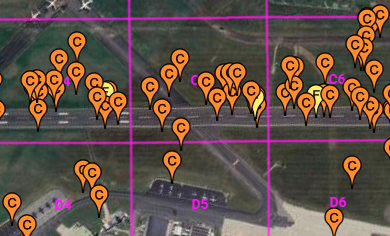
Every log the team saves goes straight to the A1 Airside portal, where it appears on the airfield map and in the reports.

Bird control logs plotted on the Teesside airfield map in the A1 Airside portal
Logs plotted on the Teesside airfield map
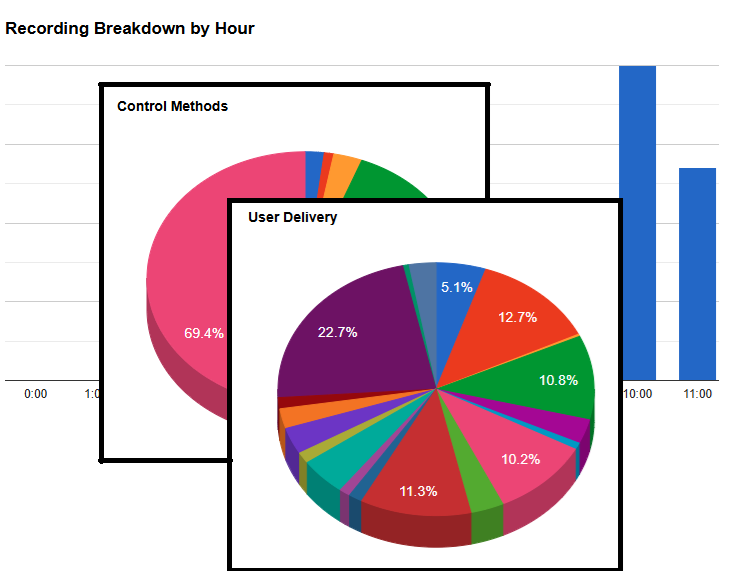
Portal charts showing recordings by hour, control methods used and logs by user
Recordings by hour, control methods used and logs by user

Everyone benefits

Built for one airfield, available to all

A1 Airside is one shared system, so every feature we built for Teesside is now available to all our customers. If your team needs something it doesn't do yet, tell us. We'll do our best to make it happen.

How we support you
A1Is your system struggling?

If your logging system is hard to maintain or doesn't fit how you work, we'll look at what you do now and set up A1 Airside to match.

Book a demo

or email sales@a1airside.com

Phone number